Google Calendar, together
Family plans and personal Google calendars, side by side.
 Farenda
Public beta · iPhone & iPad
Family plans, personal calendars and shared lists. Together, with Google Calendar.
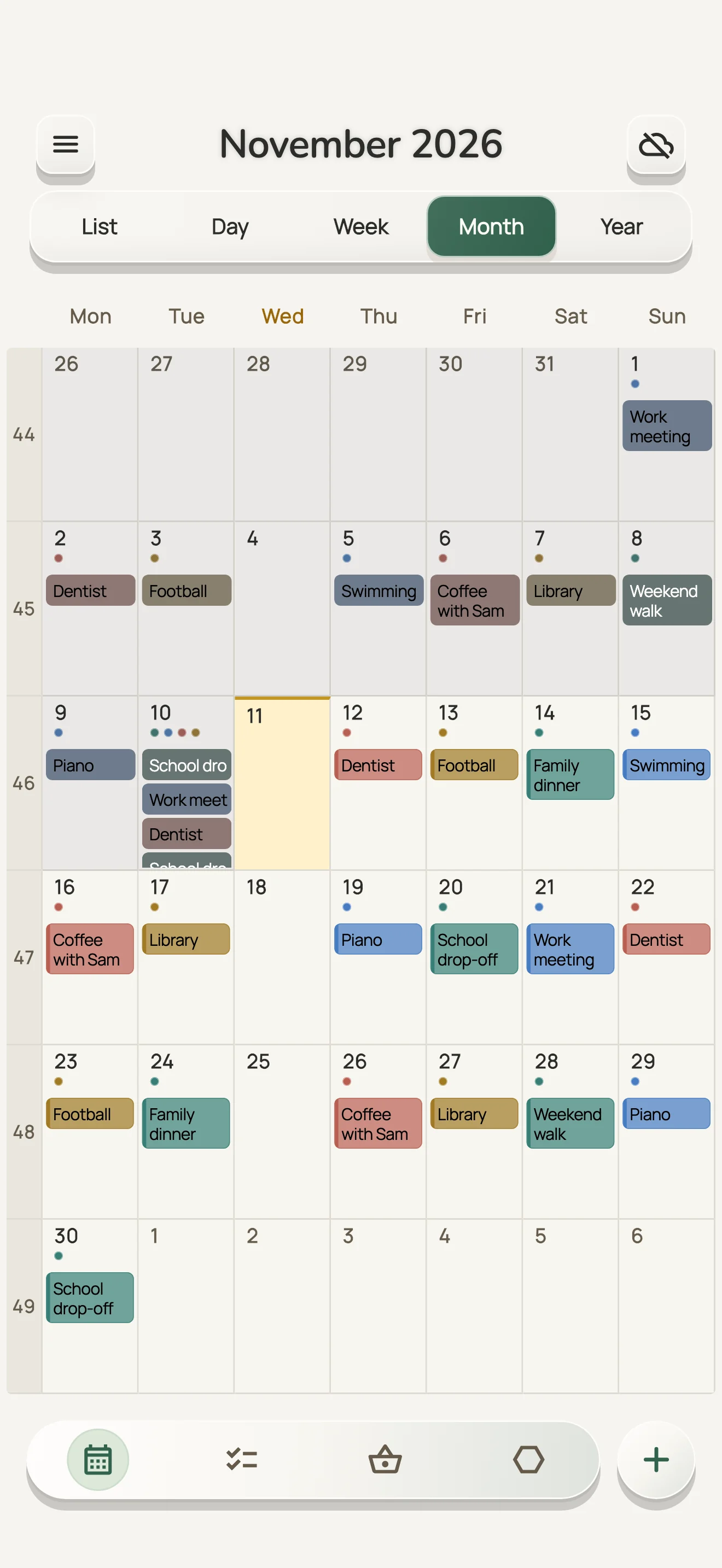
Family plans and your selected personal Google calendars, side by side. Changes sync both ways.
Farenda app screens · example family
Enlarge screenshotFamily plans and personal Google calendars, side by side.
Recognise family plans at a glance. Assign events when responsibility matters.
Selecting a personal calendar does not share it with your family.
Your daily planning stays focused.
Look back. Plan ahead. Even on Free.
Take your calendar with you in ICS or CSV.
See plans and queue event edits while away from a connection.

Less time coordinating. More time together.
One shopping list for everyone
Small tasks. Clear responsibility.
Ten everyday features. Start with five, then explore the rest.
Scroll sideways to compare all six apps. You can also focus the table and use the arrow keys.
| What you want to do | FarendaMobile beta | Google CalendarPersonal account | TimeTreeFree / Premium | FamilyWallStandard / Premium | CoziFree / Gold / Max | CalendarsReaddle |
|---|---|---|---|---|---|---|
| My colour is selected automatically | My member colour; custom colours too | Calendar colour, then manual choice1 | Remembers the last label colour1112 | Member colour applied automatically19 | Colours follow selected participants24 | Inherits calendar colour; tier unclear2930 |
| Two colours: the event and the activity | Main colour + activity accent¹ | Event colour; Workspace labels110 | One event-label colour12 | Separate activity accent unconfirmed1920 | Member dots; activity colour unconfirmed24 | Calendar/event colours; dual colour unconfirmed29 |
| A child’s own scheduleFarenda display rules only. Direct Google Calendar access is not revoked. | Rules per child/calendar; own events retained | Calendar and private-event controls23 | Sharing is set per calendar13 | Matching child rule unconfirmed22 | All members have full account access24 | Matching child rule unconfirmed31 |
| Calendar, tasks and shopping together | Calendar + assigned tasks + shopping | Calendar/Tasks; shared lists separately49 | Calendar + shared memo checklists1415 | Calendar + assigned tasks + shopping20 | Calendar + chores + shared lists2526 | Calendar + tasks; sharing/tier unclear3032 |
| Personal and family plans in one view | Selected Google calendars together | Personal + shared calendars together23 | Private Home view on mobile1316 | Google connection with Premium2021 | Read-only feeds in the shared account2427 | Unified view; multi-account tier unclear3031 |
| Create an event for someone else | Assignee independent of author | Invite guests or use a shared calendar8 | Event participants; assignee unconfirmed35 | Assign events to family members19 | Choose the event’s participants24 | Event invitations; assignee unconfirmed32 |
| Use the schedule without internet | Cached mobile events + queued edits | Mobile edits; desktop is view-only56 | Create/edit now; sync when online17 | Calendar offline edits unconfirmed20 | Android cache + later synchronization28 | View/edit offline; sync when online32 |
| No ads while using the calendar | No ads in calendar navigation or edits | Unconfirmed in checked documentation9 | Premium removes ads18 | Premium removes ads21 | Gold or Max removes ads25 | No ads, per Readdle34 |
| Plan ahead on the free plan | No artificial horizon; Free limits apply | Free calendar; no paid horizon stated9 | Free calendar; horizon unconfirmed18 | Free calendar; horizon unconfirmed2021 | Current Free horizon unconfirmed2425 | Current Free horizon unconfirmed3032 |
| Export your calendar for free | Mobile ICS + CSV, including Free | Free ICS export on a computer7 | Event export is not supported16 | iCal feed; Free ICS/CSV unconfirmed23 | Read-only feed; CSV unconfirmed27 | Export exists; format/Free tier unclear33 |
Showing the first 5 of 10 features.
Offline changes reach other devices after reconnection. Farenda Web requires internet. Colour, author and assignee are independent.
Official sources checked 14 October 2026. “Unconfirmed” means the reviewed documentation does not establish the exact capability; it does not mean the feature is absent.
Paid, partial and unconfirmed capabilities are stated in the cells. Calendar sharing, event guests and assigned responsibility are different mechanisms. A member filter is not automatically a parent-enforced child rule.
Yes. Farenda currently uses Google sign-in and Google Calendar. Connect your calendars, then invite your family to your shared calendar. iCloud and Outlook connections are not available yet.
Yes. Choose which personal Google calendars appear beside your family calendar. Farenda does not share those personal calendars when you select them. Existing Google sharing permissions still apply. For shared family calendars, Farenda can filter what children see inside the app; a person with direct Google Calendar access can still see events there.
After setup and a successful sync, the iPhone and Android apps let you view cached calendar events and create, edit or delete events offline. Pending changes sync when your connection and calendar access return. Family setup and membership changes require a connection. The web workspace is online-only.
The Free plan includes two active family members and one shared family calendar, the core calendar views, Google sync, and ICS/CSV export. Personal calendar selections do not use that family-calendar allowance. Extra family capacity, search and birthdays depend on the plan or beta access. Launch pricing will be confirmed before any paid offer.
On iPhone or iPad, use the TestFlight button to open the beta invitation directly. For Android, prepare and send the email request below for available testing options. Farenda is in beta; availability may change. Preparing a draft does not send it or reserve a place.
FarendaHelp shape a calmer way to plan family life.